What is an Instagram auto responder?
Software connected to an Instagram professional account that automatically replies to people who interacted with that account first: a comment on a post or reel, or a direct message. It uses the messaging and comment permissions the account owner grants through Meta.
People also search for it as an Instagram autoresponder, an auto responder for IG or an Instagram auto reply tool. They all describe the same job: the person who asked gets an answer while you are busy, asleep or on another post.
Most businesses use it for one situation. A post asks people to comment a word to receive something: a guide, a price list, a booking link. Without automation, someone has to open every comment and answer it by hand. With it, every person who asked gets the same answer within minutes.
How does an Instagram auto responder work?
A comment-based auto responder does three things, in this order.
- It reads the comment. The tool checks new comments on the post you chose and looks for your keyword. You decide whether the comment has to contain the word or be exactly the word.
- It replies in public. A short reply under the comment, such as "Sent you the details in a private message". Other readers see that the offer is real and where the answer went.
- It sends one private message. The commenter receives a direct message with your text and your link. That is the answer they asked for.
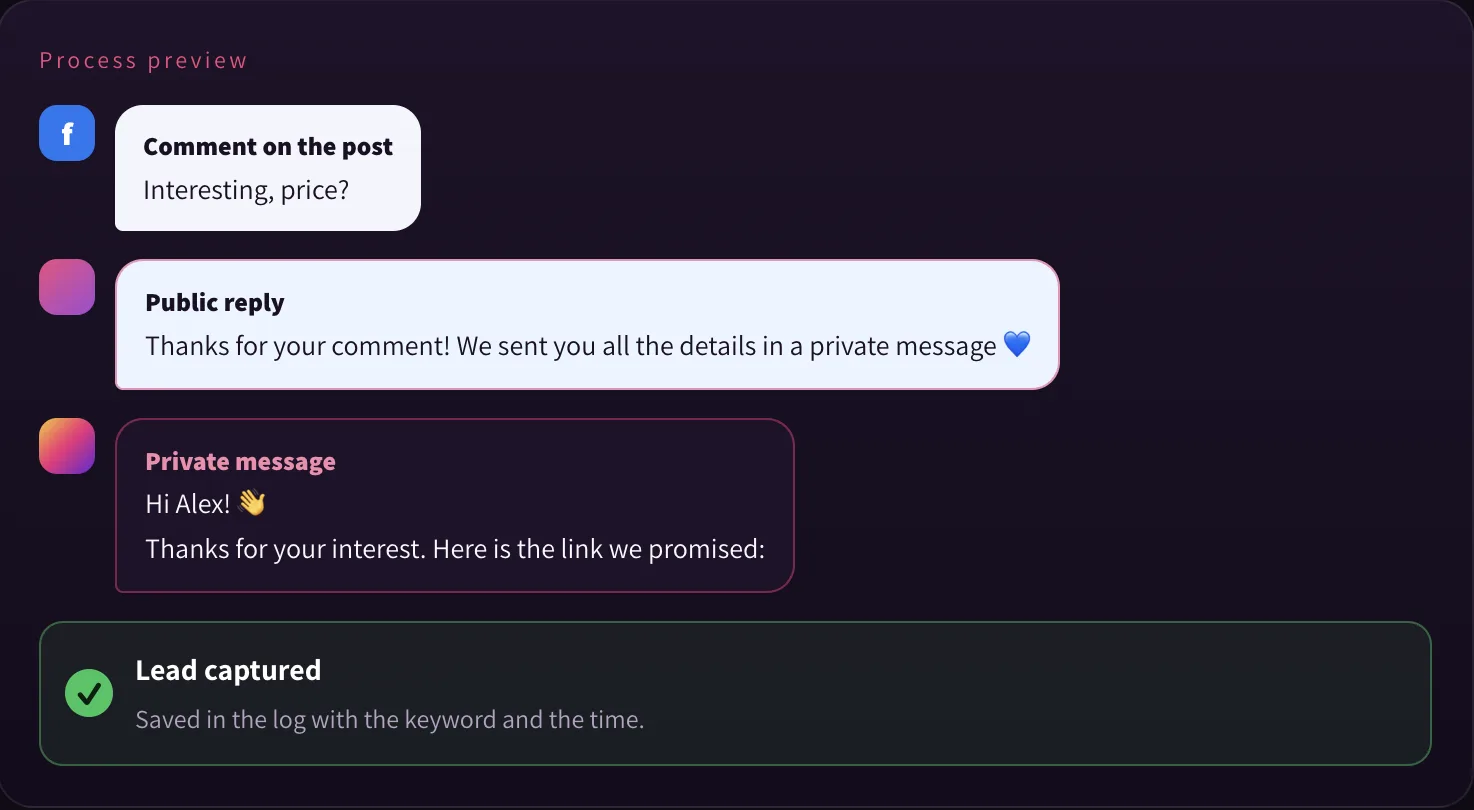
SocialFlow also saves each commenter in an activity log with the keyword, the post and the time, so you can see which post brought requests. The same flow works on Facebook Page posts.
How to set up an Instagram auto responder in three steps
Before you start you need an Instagram professional account (Business or Creator) that is linked to a Facebook Page, because SocialFlow connects through Facebook Login. You sign in with Facebook once and choose which Page and Instagram account the app may use.
Choose the account and the post
Pick the Instagram account, then the post or reel the automation should watch. You can also choose all posts on the account.
Add the keyword and the public reply
Type one short keyword, such as GUIDE, and write the public reply. You can add several reply variants and SocialFlow rotates between them, so the replies under your post do not all read the same.
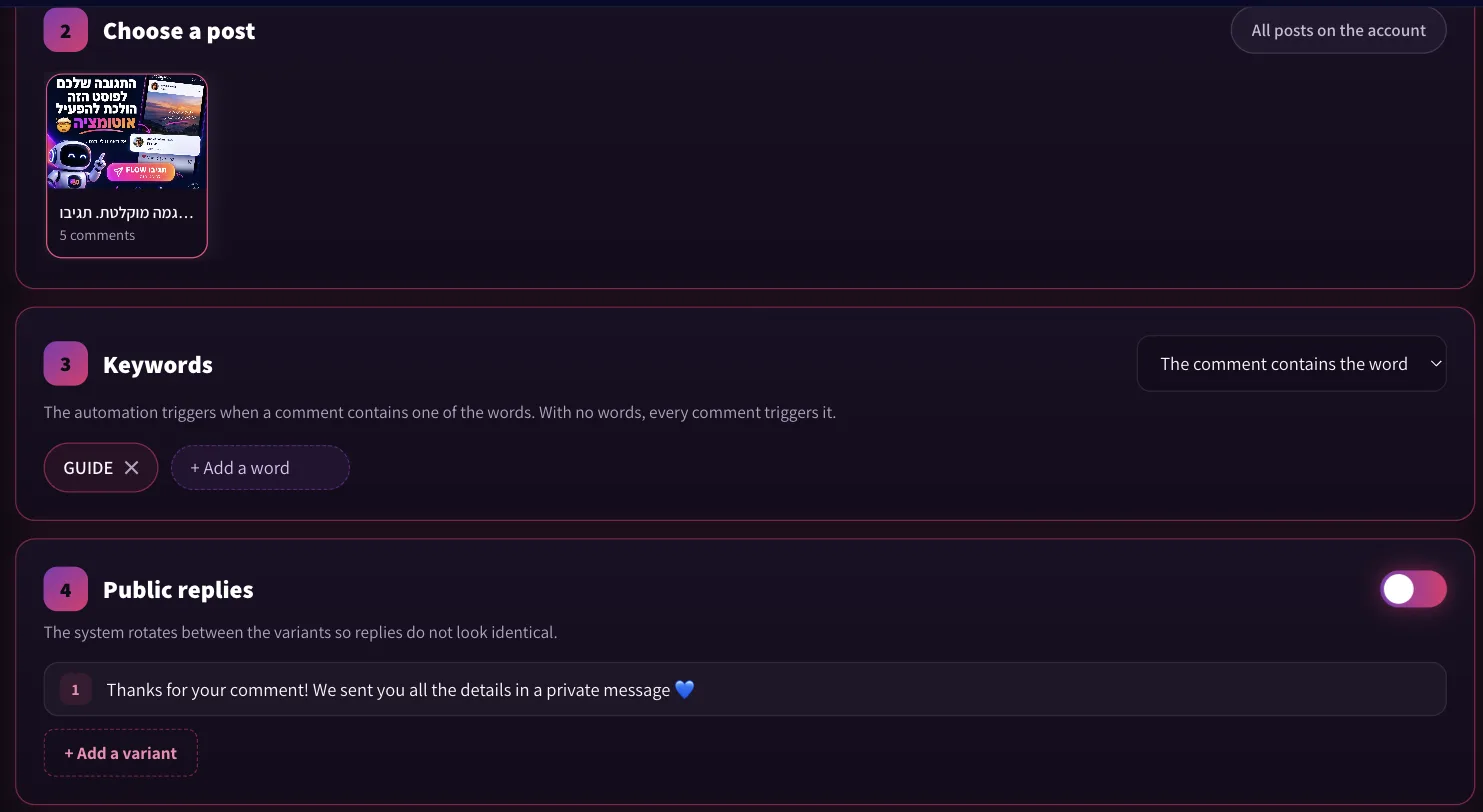
Write the private message and activate
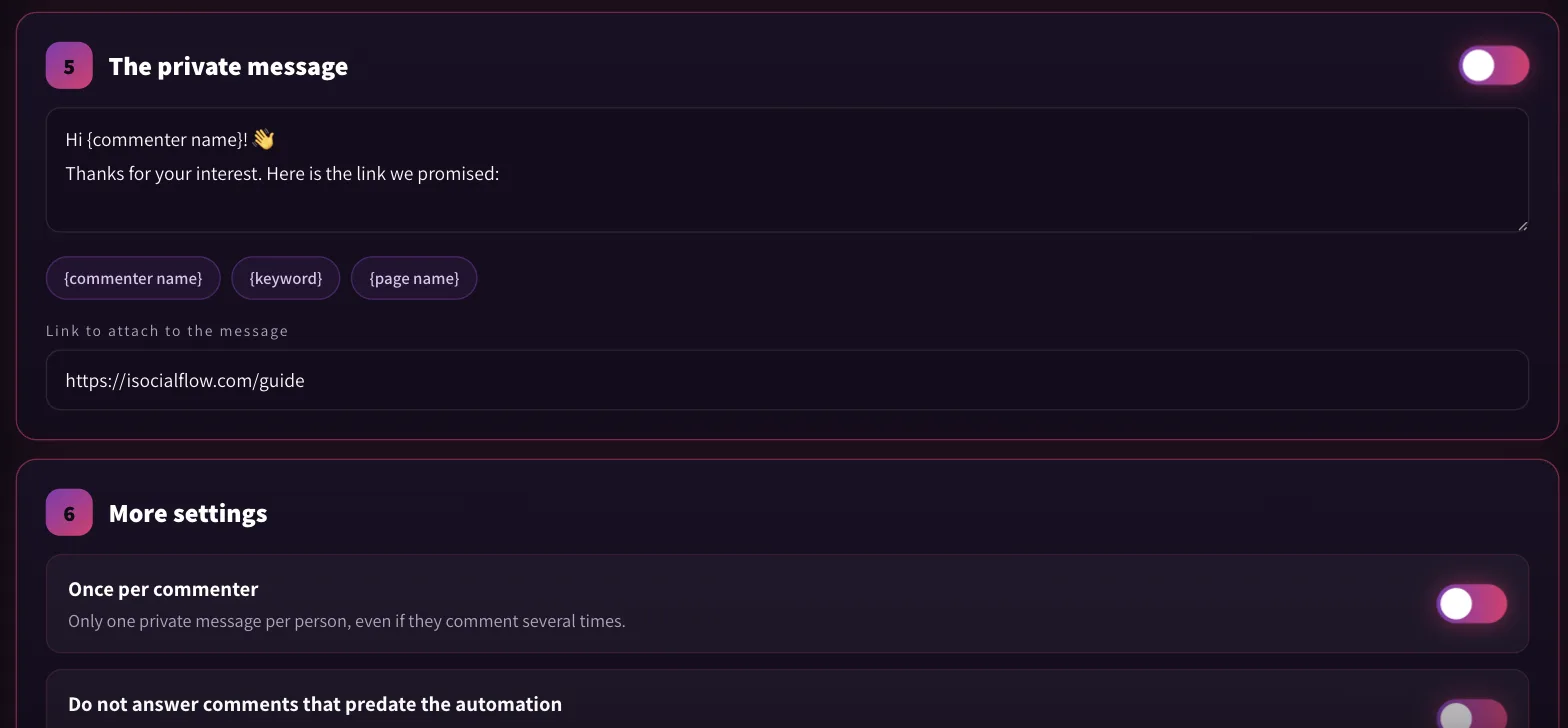
Write the message and paste the link. Placeholders such as the commenter name and the keyword are filled in for each person. Leave "Once per commenter" on, so a person who comments twice still gets one message. Then activate, or save the automation as paused and turn it on later. It handles comments written after activation, not older ones.
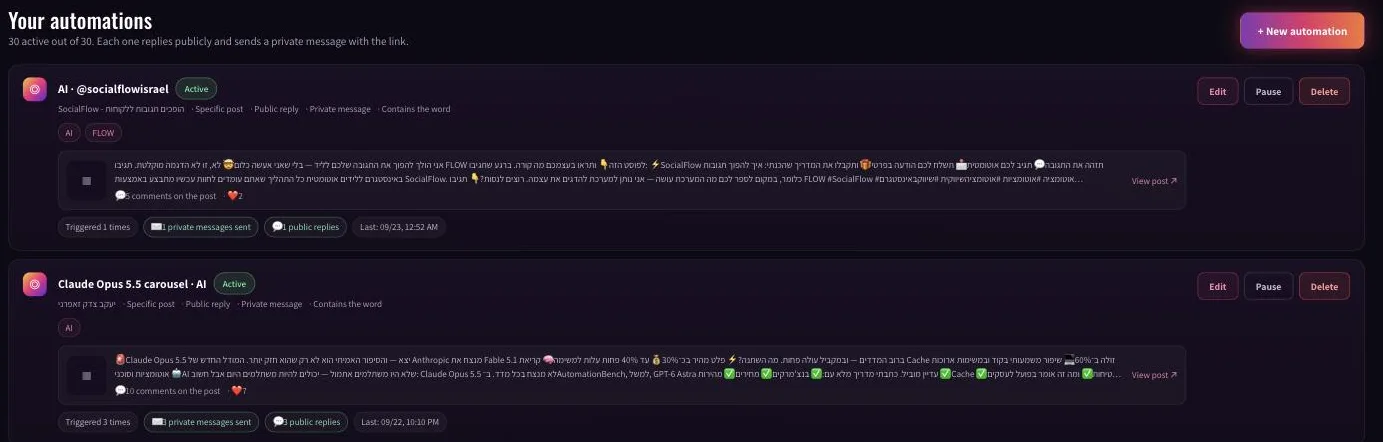
Once it is live, each automation shows how many times it was triggered and how many public replies and private messages went out.
What rules does Meta set for Instagram auto replies?
Every rule below comes from Meta's developer documentation, linked in the sources. A tool that runs on the official API has to follow them, whichever tool it is.
- One private message per comment. Meta allows a single private reply to the person who commented. Meta, Private Replies
- Within 7 days of the comment. The private reply has to be sent within seven days of when the comment was made. Meta, Private Replies
- The 24-hour window. You can continue the conversation only if the person answers your message, and then within 24 hours of their answer. Meta, Messaging API
- They contact you first. A business account can message a person only after that person has messaged the account or commented on its content. An auto responder answers; it never starts a conversation.
- A professional account. The API works with Instagram professional accounts. Through Facebook Login, which SocialFlow uses, the account must be connected to a Facebook Page. Meta, Instagram API with Facebook Login
Worth knowing: a private message to someone who does not follow you usually lands in their message requests, not the main inbox. That is why the public reply should say a message was sent.
A tool that asks for your Instagram password instead of an official Meta sign-in is not using the API, and it puts the account at risk. SocialFlow never asks for it.
Can you run it from Claude or ChatGPT?
Yes, on the Pro plan and above. SocialFlow includes an MCP server, the open standard that lets AI assistants use outside tools. Connected to Claude or ChatGPT, you can write "open an automation on my latest reel: whoever comments guide gets this link" and the assistant builds it. It can also pause automations, change the wording, pull a report and publish posts and reels to Instagram and Facebook.
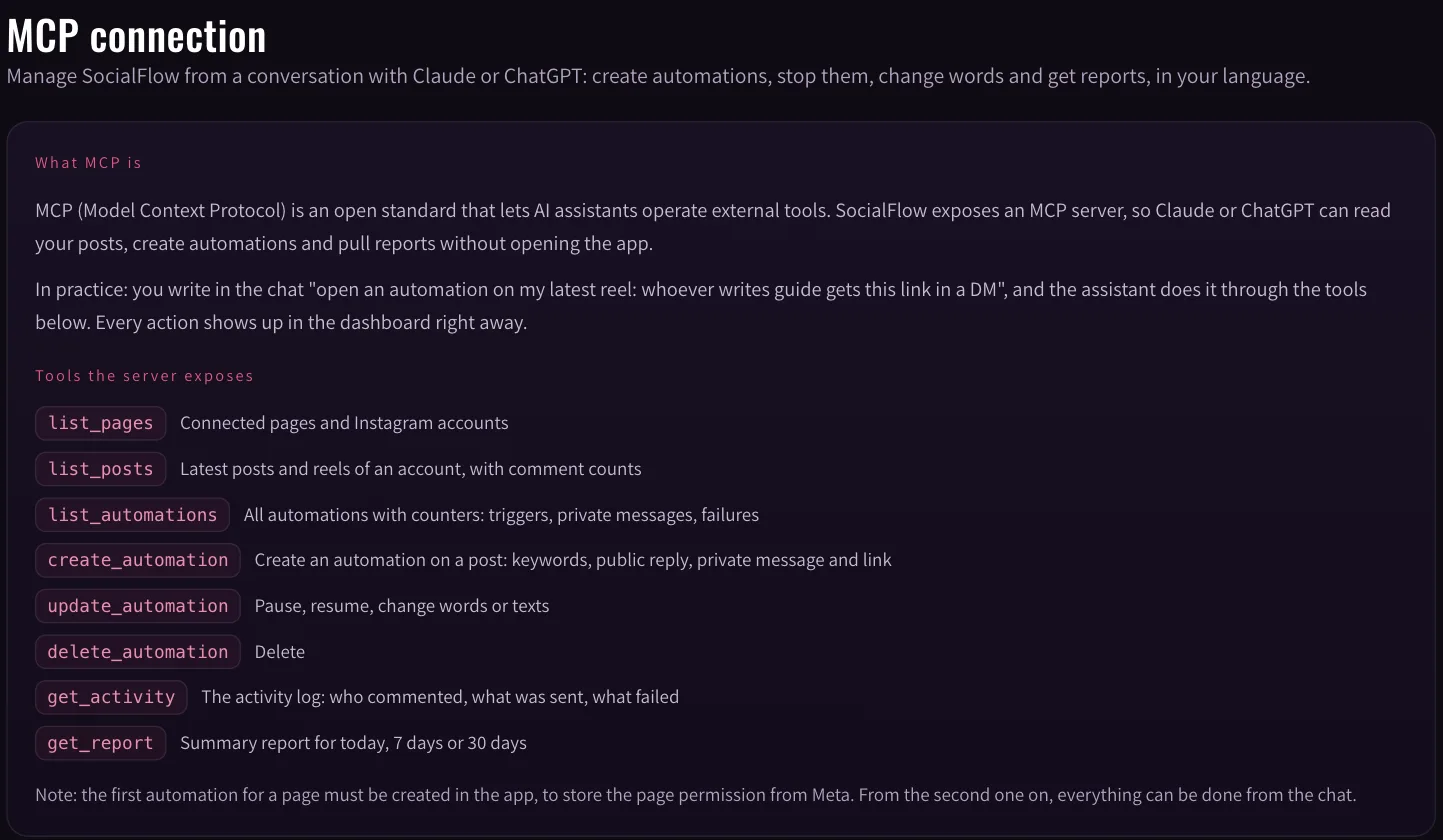
One limit to know: the first automation for a Page is created in the app, so the Page permission from Meta is stored. From the second one on, the chat can do the rest.
How much does an Instagram auto responder cost?
SocialFlow bills by private messages sent each month, not by the number of people who commented. The free plan has 3 active automations and 300 private messages a month, and adds a short "Sent with SocialFlow" line to each message. Paid plans remove it.
| Plan | Per month | Active automations | Private messages a month | Accounts | MCP and publishing |
|---|---|---|---|---|---|
| Free | $0 | 3 | 300 | 1 | No |
| Creator | $12 | Unlimited | 3,000 | 2 | No |
| Pro | $24 | Unlimited | 20,000 | 5 | Yes |
| Agency | $59 | Unlimited | 100,000 | 15 | Yes |
Annual billing gives two months free. Full details are on the pricing page. For a side by side with another tool, see the ManyChat alternative page. For the method behind the keyword and the wording, read the guide to turning comments into leads.