ManyChat Alternative: Why Teams Switch to SocialFlow (2026)

SocialFlow is a ManyChat alternative for Instagram and Facebook: when someone comments on your post, it posts a public reply and sends them a private message with your link. Teams switch because it bills per private message sent instead of per active contact, stops at the limit instead of adding overage, has a built-in MCP server for Claude and ChatGPT, and works right to left in nine languages. The free plan includes 300 messages a month.

In short
  • ManyChat bills per active contact, meaning every person who interacted with you this month. SocialFlow bills per private message it actually sent.
  • Pass your quota on ManyChat and automations keep running while the overage goes on your next invoice. On SocialFlow sending pauses and you get an alert.
  • A month where a reel brings 3,000 commenters: $64 on ManyChat Pro. The same 3,000 messages fit in SocialFlow Creator at $12.
  • SocialFlow has an official MCP server built in. ManyChat has none; only third-party wrappers over its API.
  • Right-to-left is built in, and the interface speaks nine languages. ManyChat has an open community request for Hebrew and Arabic support.
  • Switching is one sign-in through the same official Meta connection, and a first automation takes minutes.

Why people look for a ManyChat alternative

Most people who search for a ManyChat alternative already use it for one job: someone comments a keyword on a post and gets a link in a private message. The reasons they look elsewhere are about how that job is billed and run, not about whether it works.

1. You pay for people, not for work done

ManyChat bills by active contacts: anyone who interacted with your account through ManyChat during the billing month. Someone who commented once and never returned counts exactly like a customer. The better your content does, the more you pay.

2. The price jumps with your reach

Each tier covers a band of contacts: 250 on Essential at $17, 2,500 on Pro at $39, 7,500 on Business at $99. To choose a tier you have to guess next month's audience. The full breakdown, with worked examples, is on the ManyChat pricing page.

3. Overage runs quietly

Per ManyChat's help centre, when you pass the included contacts your automations keep running and the extra contacts are added automatically to your next bill: $0.10 each on Essential, $0.05 on Pro. A 3,000 commenter month on Essential comes to $292 on a $17 plan.

4. A flow builder for a one step job

ManyChat is built around a visual flow editor. For comment, reply and message, that is more machinery than the job needs. In SocialFlow the whole automation is one screen: post, keywords, public reply, private message.

5. No official MCP server

ManyChat has no official MCP server. Third-party wrappers over its public API exist, and they need an API key and a manual config entry. Its own community carries an open request for an "API for the AI agent era".

6. No right to left

ManyChat has no built-in right-to-left support. There is an open community request for Hebrew and Arabic, and the common workaround is a third-party Chrome extension.

What SocialFlow does differently

SocialFlow is a business messaging tool for Instagram and Facebook built on Meta's official API, with the account owner's permission. It only ever answers people who commented on your post or wrote to you first.

One screen from post to message

Pick a post or reel, add the keywords that should trigger it, and write the public reply. You can add several reply variants and SocialFlow rotates between them so replies do not look identical. Leave the keywords empty and every comment on that post triggers it.
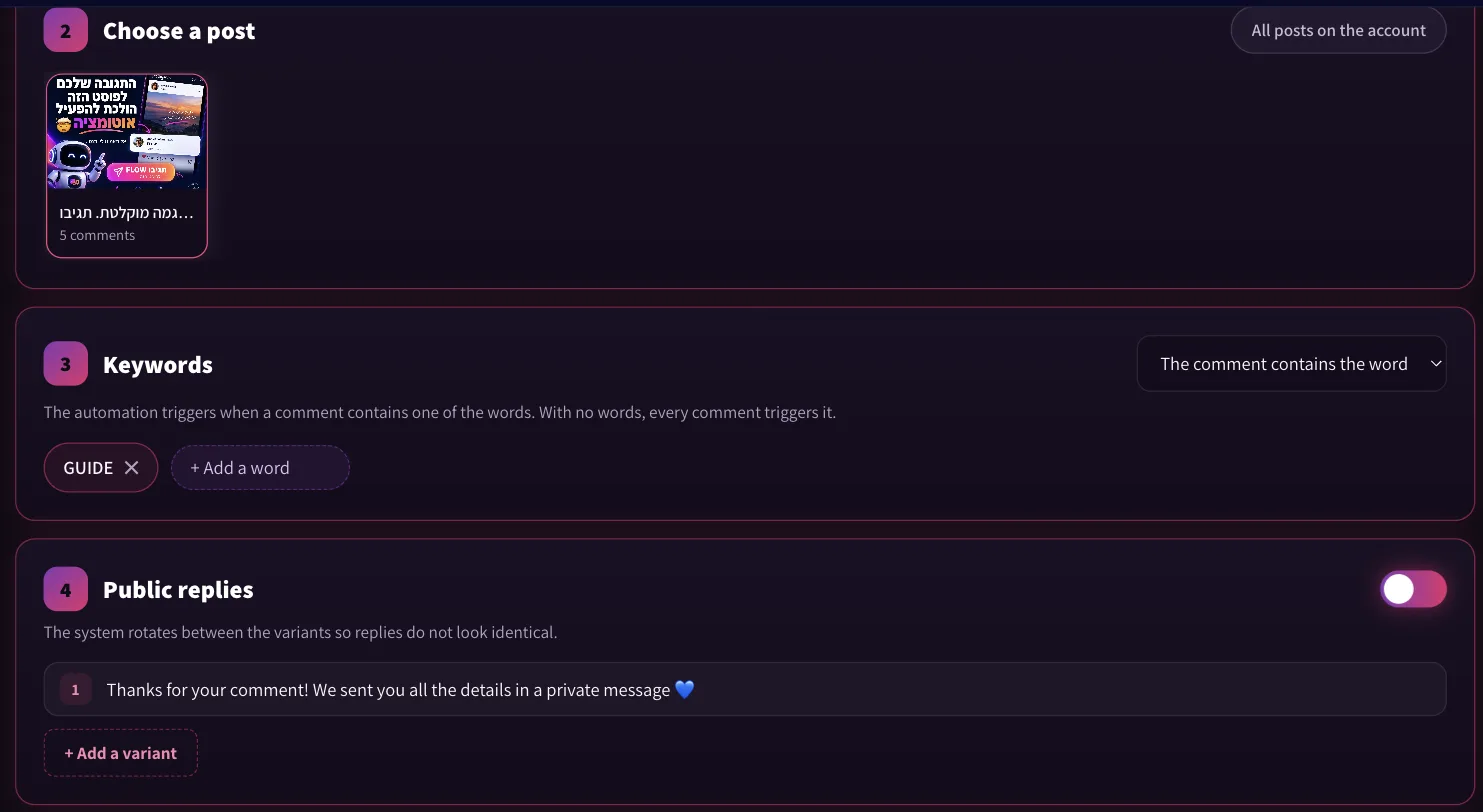
SocialFlow automation editor: choosing a post, the keyword GUIDE and a public reply
The automation editor: choose the post, add a keyword, write the public reply.

The private message, with your link

The private message can use the commenter's name, the keyword and your page name, and carries the link you want to send. Two settings matter in practice: once per commenter, so a person who comments three times gets one message, and ignore comments that predate the automation, so switching it on does not message people from last month.
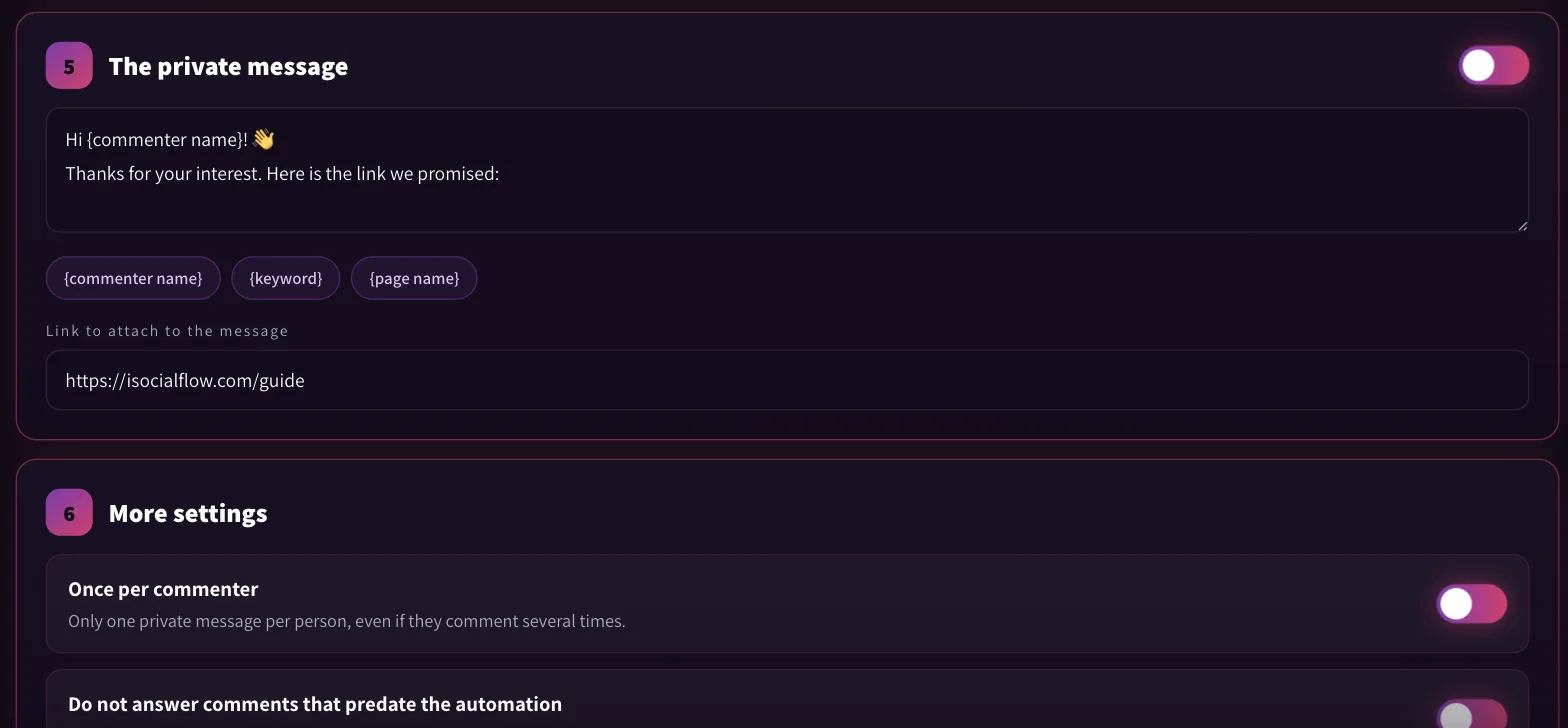
SocialFlow private message settings with name placeholder, link field and the once per commenter option
The private message, the link, and the once per commenter setting.
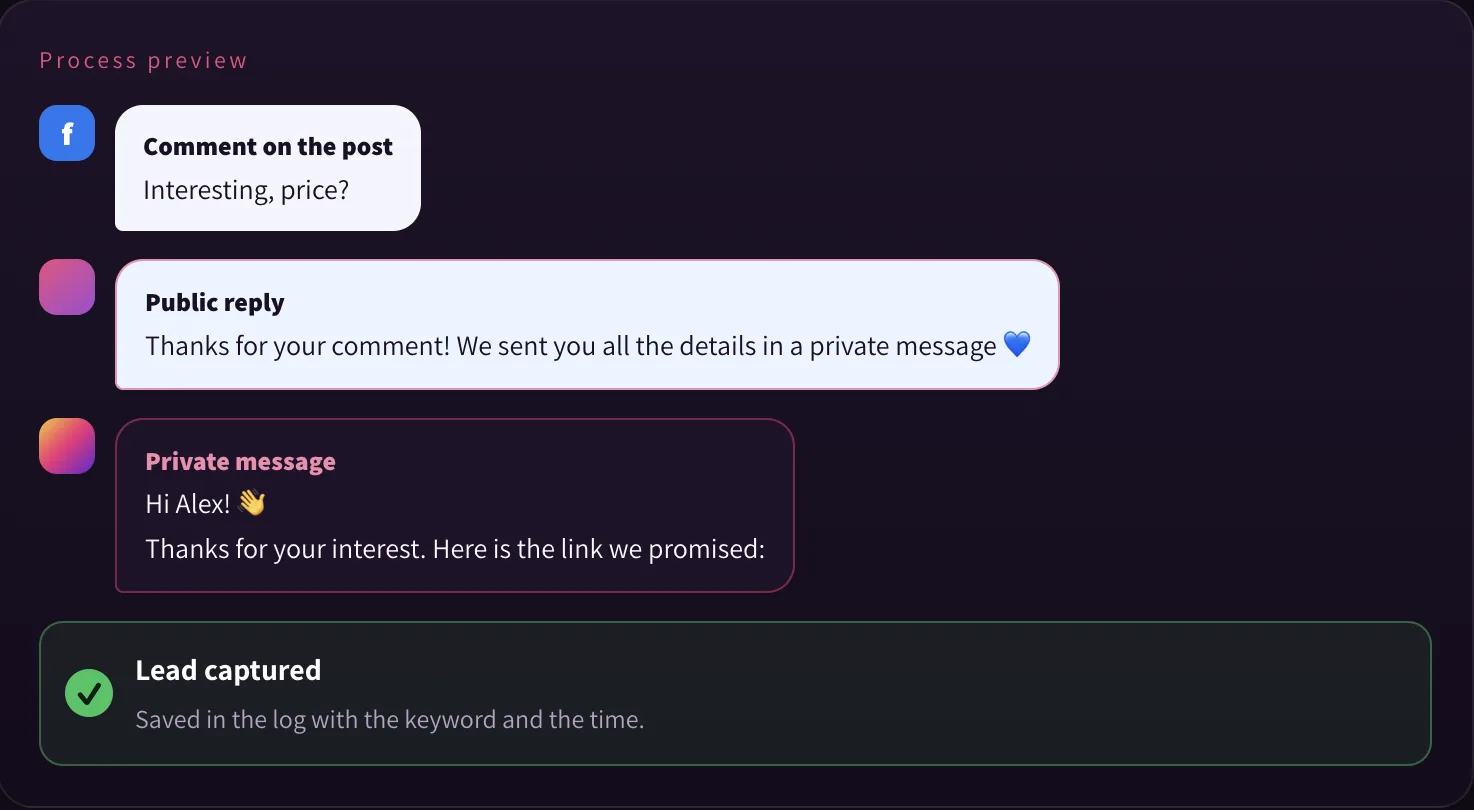
Preview of a comment, the public reply and the private message in SocialFlow
The preview shows exactly what the commenter will see, and each person is saved as a lead.

Run it from Claude or ChatGPT

From the Pro plan, SocialFlow exposes an MCP server. Connect it once and you can ask, in plain language, to create an automation on your latest reel, pause one, change its keywords, or get a report for the last seven days. The first automation for each page is created in the app so the Meta permission is stored; after that, everything can be done from the chat.
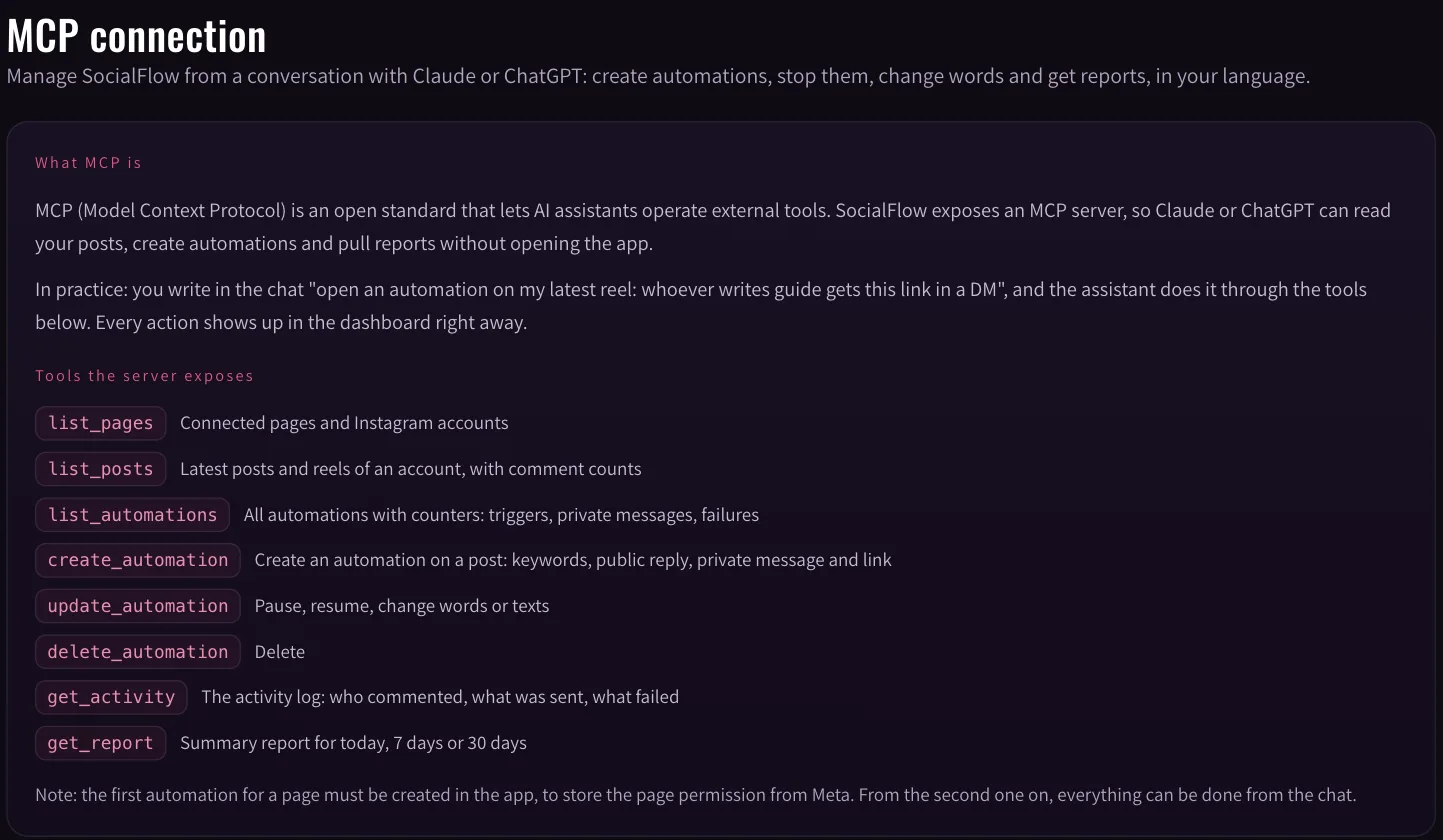
SocialFlow MCP connection screen listing the tools Claude or ChatGPT can use
The MCP tools Claude or ChatGPT can call: list posts, create, update or pause automations, pull reports.

Counters you can read at a glance

Every automation shows how many times it triggered, how many private messages and public replies it sent, and when it last ran.
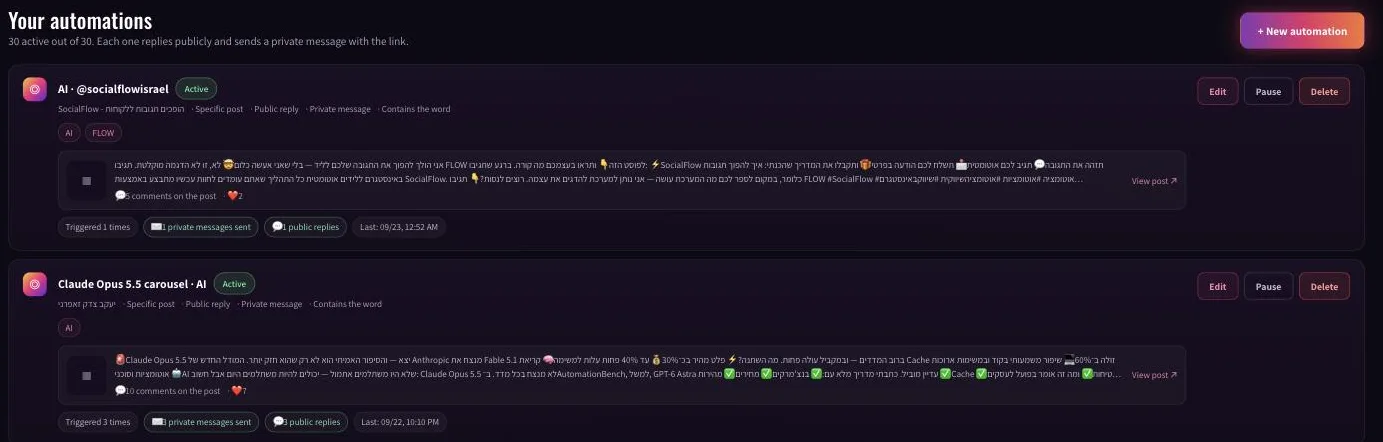
SocialFlow automations list with trigger, private message and public reply counters
The automations list, with counters per automation.

Three ways teams use it

A creator running a reel with a keyword

The reel ends with "comment GUIDE and I will send it to you". One automation on that reel, keyword GUIDE, a public reply that says the link is on its way, and a private message with the link. Because the meter counts messages, a reel that takes off does not change the plan you need until you pass your monthly allowance.

A business answering price questions in comments

People ask "price?" and "how much?" under posts. An automation with those keywords replies publicly that the details are in their messages, and sends the price list or a booking link privately. The person who asked gets an answer in seconds, and the conversation moves to the inbox where it belongs.

An agency on several accounts

Pro connects 5 accounts with 3 users, and Agency connects 15 accounts with 10 users. Through MCP an account manager can list every connected page, see each automation's counters and pull a seven day report, without clicking through each account.

SocialFlow vs ManyChat, row by row

SocialFlowManyChat
What you are billed for
Billing unitPrivate messages sent this monthActive contacts, anyone who interacted this month
Passing the limitSending stops and you get an alertAutomations keep running, overage goes on the next invoice
Overage rateNone. Upgrade, or wait for next month$0.10 per contact on Essential, $0.05 on Pro, $0.025 on Business
Billing currencyShekels in Israel, dollars elsewhereDollars
Pricing
Free$0, 300 private messages a month$0, 25 active contacts a month
Entry tierCreator, $12 a monthEssential, $17 a month
Professional tierPro, $24 a monthPro, $39 a month
Agency tierAgency, $59 a monthBusiness $99, Advanced $199
TrialA month of Pro for one unit of currencyA permanent free tier, no paid trial
Language
Interface languages9 languagesEnglish
Right-to-left supportYes, throughoutNot built in. An open community request, worked around with a Chrome extension
Local invoicing in IsraelYesNo
Running it from Claude and ChatGPT
Official MCP serverYes, built in, from the Pro tierNo. Third-party wrappers over the API exist
What connecting takesOne sign-in, no keys and no config fileAn API token and a manual config entry
Building an automation in plain languageYesNot in the product itself
Publishing posts and reels from the chatYes, from the Pro tierNo
Pulling performance data into the chatYesNot in the product itself
Features
Public reply plus private messageYesYes
Instagram and FacebookYesYes
Branding on messagesRemoved from Creator up"Powered by Manychat" on the free tier
Time to a first automationMinutes, or one sentence to the chatBuilding a flow in the editor
Limits by tier
Professional tier volume20,000 private messages a month2,500 active contacts a month
Activity log retention365 days on ProNot published as a tier limit
Cost of a month with 3,000 enquiries$24, inside the tier$39 plus $25 in overage

Switching from ManyChat, in practice

  1. Sign in with Facebook. SocialFlow connects through the same official Meta interface you approved for ManyChat. Pick the page and the Instagram business account.
  2. Rebuild the automations you use. For each one: pick the post, type the keyword, paste the link. Minutes, not a project.
  3. Pause the ManyChat automation on that post, so each commenter gets one reply.
  4. Optional, on Pro: connect Claude or ChatGPT through MCP and create the rest in plain language.

There is no export or import step, and no month where you pay for both. New customers can try Pro for 30 days for $1.

Is there a free ManyChat alternative?

Yes. SocialFlow's free plan needs no card and includes 300 private messages a month with 3 active automations on 1 account. ManyChat's free plan counts 25 active contacts a month. When you outgrow it, Creator is $12 a month for 3,000 messages with no SocialFlow branding. All plans are on the pricing page.

ManyChat vs Chatfuel, and where SocialFlow fits

People comparing ManyChat and Chatfuel are usually choosing a billing model as much as a tool. Here is what each one publishes, checked on 23 September 2026.

  • ManyChat bills per active contact, in five tiers from free to $199 a month, with overage per contact past each tier's quota.
  • Chatfuel sells a Business plan and an Agency tier. On the day of the check its pricing page listed Business at US$69, shown as US$18 a month billed yearly (US$216 a year) under a limited offer running until 30 September 2026, and Agency S at US$90 a month billed yearly. Its plans start with a free trial; the pricing page lists no permanent free plan. Business includes US$20 of AI credits a month, and the page leads with WhatsApp and AI assistant features. Chatfuel's site is published in English, Spanish and Portuguese.

Where SocialFlow fits: if the job is answering comments on Instagram and Facebook with a reply and a private message, SocialFlow does that one job, with a permanent free plan, a meter based on messages sent, a hard stop instead of overage, an interface in nine languages including right to left, and an official MCP server for Claude and ChatGPT.

Frequently asked questions

What is the best ManyChat alternative for Instagram comments?

SocialFlow is built for exactly that job: it answers people who comment on your Instagram or Facebook posts with a public reply and a private message containing your link. It bills per message sent rather than per active contact, stops at the limit instead of billing overage, and has a free plan with 300 messages a month.

Is there a free alternative to ManyChat?

Yes. SocialFlow's free plan includes 300 private messages a month and 3 active automations, with no card required. Paid plans start at $12 a month.

How much does SocialFlow cost compared to ManyChat?

SocialFlow Pro is $24 a month for 20,000 private messages. ManyChat Pro is $39 a month on monthly billing for 2,500 active contacts, plus $0.05 per contact past that.

What happens when I reach my monthly limit?

On SocialFlow sending pauses and you get an alert, with no extra charge. On ManyChat automations keep running and the overage is added automatically to your next invoice.

Does ManyChat have an MCP server?

There is no official MCP server from ManyChat. Third-party wrappers over its public API exist and need an API key and manual configuration. SocialFlow has an MCP server built into the product from the Pro plan.

Can I move from ManyChat to SocialFlow without losing my accounts?

Yes. SocialFlow connects through the same official Meta interface, so the page and Instagram business account you already use come across in one sign-in. Automations are rebuilt, which takes minutes each.

ManyChat vs Chatfuel: which is cheaper?

They price differently. ManyChat charges per active contact, from $17 a month on Essential with overage past each quota. Chatfuel's pricing page, checked on 23 September 2026, showed its Business plan at US$18 a month billed yearly under a limited offer, with a free trial rather than a free plan. SocialFlow has a permanent free plan and charges per message sent, from $12 a month.

Does SocialFlow message people who did not contact me?

No. SocialFlow only answers people who commented on your post or wrote to you first, through Meta's official API and with the account owner's permission.

Sources

ManyChat prices and limits were checked on 23 September 2026 against ManyChat's help centre and a 2026 pricing roundup, and reflect the structure launched on 2 March 2026. Chatfuel figures were checked on 23 September 2026 on chatfuel.com; the Business price shown was a limited offer. Pricing changes, so confirm with each vendor before deciding. SocialFlow figures are read directly from the product plan catalogue.

Try it on your next post

The free plan asks for no card: 300 private messages a month. Connect a page, build one automation, and see how it runs on your next reel.